
For the independent creator or the lean marketing team, the initial “magic” of generative AI usually wears off during the first attempt to produce a cohesive campaign. It is relatively easy to generate a single, stunning image of a product in a stylized environment. It is significantly harder to generate forty variations that maintain the same lighting, material texture, and brand essence without exhausting both your budget and your patience.
The failure at scale rarely stems from a lack of “prompt engineering” talent. Instead, it is usually a failure of the pipeline. Creators often approach generative tools as a lottery—hitting “generate” until the right image appears—rather than as a multi-stage production funnel. To move from experimental play to professional output, you must audit your workflow based on speed, semantic control, and the economic reality of credit burn.
The Pivot from Prompt Engineering to Pipeline Engineering
The transition from hobbyist to operator begins when you stop treating the prompt as a magic spell and start treating it as a configuration file. In a professional setting, the “lottery” approach is the primary cause of project delays. If a model has a 20% success rate for a complex composition, and each generation takes 30 seconds, a batch of ten usable assets could realistically take hours of manual filtering.
Identifying friction points is the first step of the audit. You must account for latency (how long you wait to see if an idea worked), credit exhaustion (the literal cost of those failed attempts), and style drift (the tendency for AI to deviate from established visual rules over a long session).
A mature generative media funnel follows a “Draft to Polish” structure:
- High-Speed Drafting: Testing composition, color palettes, and lighting with low-latency models.
- Semantic Refinement: Adjusting the prompt and parameters to ensure the AI follows specific spatial instructions.
- High-Fidelity Finishing: Moving the successful “draft” into an upscaler or a high-resolution model for final delivery.
Quantitative Metrics: Latency, Credit Burn, and Resolution Tiers
Evaluating an AI workflow requires a cold look at the numbers. Most platforms, such as Kimg AI, operate on a credit-based economy. For example, a sign-up bonus of 400 credits or a potential 840 credits through check-ins provides a specific “sandbox” for research and development. An operator’s goal is to minimize the “cost per successful asset” (CPSA).
If you are generating 1K (1024×1024) images for a social media draft, you are likely looking for speed and general “vibe.” However, if the project requires K-level resolution for web headers or print, the computational cost—and the credit cost—increases.
One common mistake is jumping straight to the highest resolution and most complex model for the first draft. This is the equivalent of 3D rendering a scene before you’ve finished the wireframe. It is a waste of resources. Speed is often a more valuable metric than initial fidelity during the ideation phase because it allows the creator to “fail fast” and pivot.
Uncertainty Note: While high-resolution models claim to offer better detail, they can sometimes introduce unwanted artifacts that were not present in the low-res preview, requiring further rounds of cleanup.
Integrating Nano Banana into High-Frequency Iteration
In the drafting phase, the priority is throughput. You need to see a variety of interpretations of your prompt as quickly as possible to identify which visual direction is viable. This is where high-efficiency models like Nano Banana become essential components of the pipeline.
By using a faster, more streamlined model for the early stages of a project, you preserve your “high-value” credits for the final rendering and upscaling stages. The strategy is to use Nano Banana as a rapid-prototyping tool. For an indie maker, this might look like generating fifty variations of a character or a background to find the one with the correct “silhouette” before committing to a more resource-intensive Banana AI generation.
Practical judgment is required here. You must decide when a draft is “good enough” to move to the next stage. If the composition is correct but the textures are slightly muddy, you don’t need to re-generate at the draft level; you move to the in-painting or upscaling phase. The objective is to maintain creative momentum, not to achieve perfection in a single click.
Evaluating Semantic Adherence in Nano Banana AI
“Semantic adherence” is a technical way of asking: Does the model actually do what it’s told? Many creators find that as prompts become more complex—e.g., “a red sphere on a glass table to the left of a blue cube, cinematic lighting”—the AI starts to ignore certain tokens.
When auditing a workflow built around Nano Banana AI, you should test for its ability to handle spatial relationships and technical instructions. A model that ignores “on the left” or “view from below” 50% of the time will double your production time.
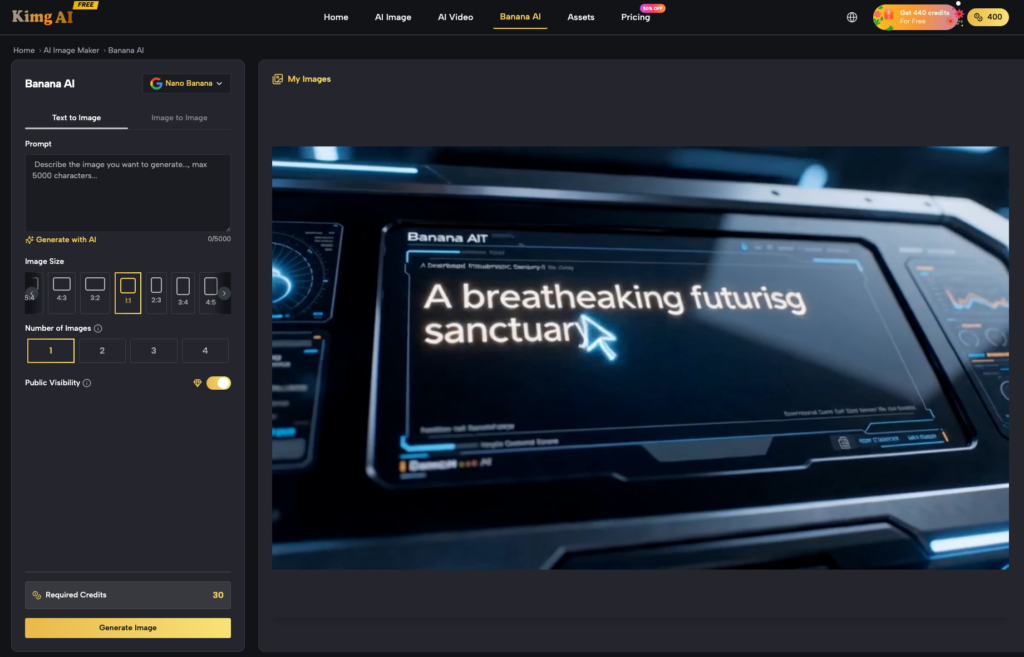
Testing Nano Banana AI against varied prompt structures helps identify its strengths. Some models excel at organic textures (skin, foliage) but struggle with rigid geometry or text rendering. Knowing these biases allows you to adjust your pipeline. For example, if you know the model struggles with text, you don’t waste time prompting for a “sign that says OPEN”; you generate the sign and add the text later in a dedicated editor or via a specific text-rendering model within the Kimg AI suite.
The Strategic Wall: What AI Workflows Still Can’t Automate
Despite the advancements in models like Banana AI and various Nano Banana iterations, there are walls that no current generative workflow can fully scale without human intervention. The most prominent is absolute brand consistency.
Even with sophisticated “image-to-image” or “seed-matching” techniques, there is an inherent randomness in generative AI. If you need a specific shade of “Brand Blue” (#0047AB), the AI might give you a slightly different hue in every session. This “style drift” is a reality of the technology.
Limitation Note: It is important to acknowledge that model updates can occasionally break existing prompt recipes. A prompt that worked perfectly last month might produce different results today because of backend weight adjustments or “unannounced” optimizations by the developers.
Because of these limitations, the final stage of any professional pipeline must involve a “human-in-the-loop” for manual editing. This includes:
- In-painting: Fixing anatomical errors or misplaced objects that the AI failed to resolve.
- Out-painting: Expanding the canvas to fit specific aspect ratios (like 21:9 or 9:16) without distorting the central subject.
- Color Grading: Using traditional tools to ensure the AI-generated assets match a pre-existing brand palette.
See also: Harnessing the Sun: The Rise of Solar Water Pump Technology for Sustainable Agriculture
Finalizing the Workflow Audit
If your visual output is failing at scale, it is likely because you are treating the AI as a final-output engine rather than a sophisticated drafting tool. To build a sustainable workflow, you must:
- Tier your models: Use high-speed options like Nano Banana for the exploratory phase to conserve credits and time.
- Measure semantic adherence: Know which models follow complex instructions and which require “hand-holding” through image-to-image prompts.
- Account for the “cleanup tax”: Budget time and credits for upscaling to K-level resolution and performing manual corrections.
AI tools are force-multipliers for art direction, not a replacement for it. By auditing your pipeline for efficiency rather than just “coolness,” you move from being a prompt-enthusiast to a production-ready creator. The goal isn’t just to make an image; it’s to build a system that can make a thousand of them without breaking your workflow.